

The Intel NUC or ‘Next Unit of Computing’ was first announced in 2012 followed by an official launch in 2013. This includes a variety of compact barebones computer kits and compute elements designed to deliver a full desktop PC experience without spending a lot. space on your desk. While it was originally associated with mini PCs, the product lineup has seen considerable evolution and is now available in various form factors to meet the different needs and requirements of consumers.
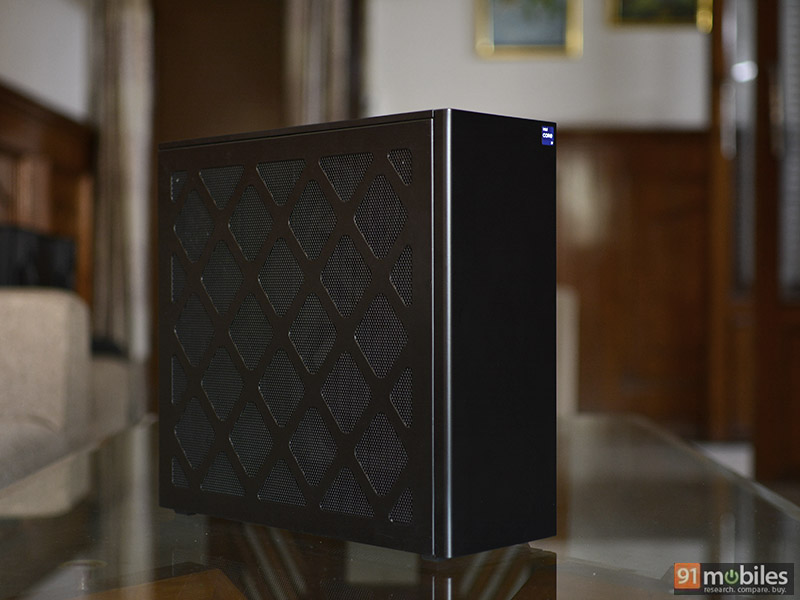
The NUC 13 Extreme Raptor Canyon is Intel’s latest offering for gamers and enthusiasts looking for raw performance. Powered by Intel’s 13th-gen Raptor Lake series of processors, this small form factor desktop can accommodate up to a full desktop-class Intel Core i9-13900K processor and even a full-size 3-slot discrete GPU . Here’s a quick look at what this beast is capable of.
low
- At first glance, the NUC 13 Extreme looks like a tiny enterprise-grade PC tower. It has a dark stealthy finish all around and is bigger and taller than the previous generation NUC Extreme model. In fact, it’s the largest NUC system Intel has ever built and shows the company is thinking in the right direction by moving toward more traditional desktop design. A larger chassis not only gives users more room to work with internal components, but it also provides better airflow and cooling. Speaking of which, there are perforated mesh panels on the top, sides, and bottom that all help promote better airflow to keep the interior cool. Best of all, these panels can be easily removed without the need for any tools. Just one thumb screw on the back and all the panels can be taken off.

- Inside is divided into two parts. The upper half is where the NUC 13 Extreme’s compute element sits, while the lower half is devoted entirely to the discrete GPU. The upper half also makes room for an SFX power supply and two pre-installed 120mm cooling fans, each providing ventilation for the top and bottom sections.
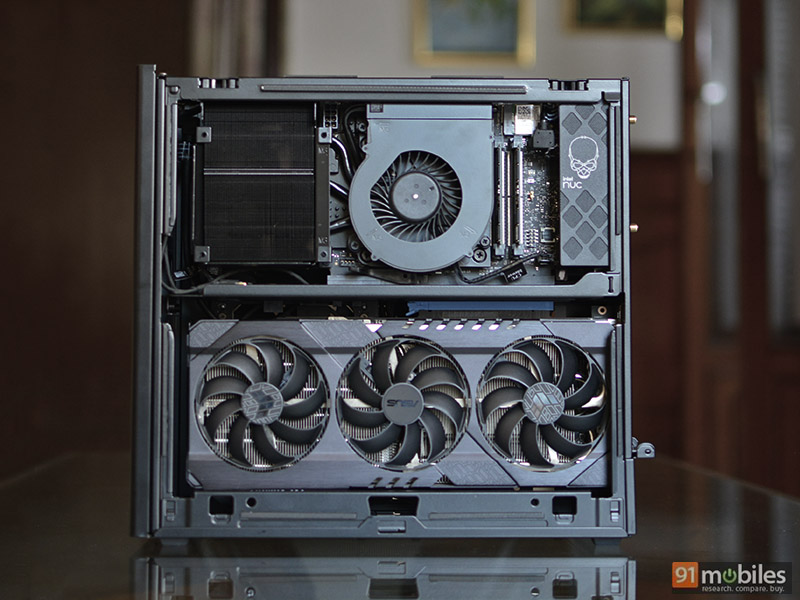
- The Compute Element is a custom motherboard that includes a processor with a heat sink solution, two DDR5 SODIMM memory slots, and three M.2 storage slots. Like the GPU, the entire compute unit can pop out and return to the main baseboard which acts like a bridge. It features PCIe slots for the Compute Unit and GPU with additional provision for installing fans and RGB devices. There are also mounting holes in the back if you want to install a 2.5-inch SATA SSD.

- The retail unit of the NUC 13 Extreme is essentially a bare-bones kit. The only factory customization option you get is the CPU, which can be either the aforementioned Core-i9 or Core i7-13700K or Core i5-13600K. Components such as memory, storage, and GPU are not included, thus one has to purchase and install them oneself. This enables the consumer to build the system according to their needs. Since we were sent a reviewer kit, our unit came with an Intel Core i9-13900K 8-core CPU, 32GB of DDR5 4800MHz dual-channel memory, 1TB PCIe Gen 4 M.2 SSD storage, and an ASUS TUF RTX 3080 Ti 12GB Was. graphics card.
- The NUC 13 Extreme comes with an excellent selection of I/O ports, including two Thunderbolt 4, one 10-Gigabit Ethernet, one 2.5-Gigabit Ethernet, six USB 3.2 Gen 2 Type-A ports, standard analog audio ports, DisplayPort, and dual USB 3.0 ports. wireless antenna. Front panel I/O includes a USB 3.2 Gen 2×2 Type-C port, two USB 3.2 Gen 1 Type-A ports, and a headphone and mic combo. Lastly, there’s also the Intel Killer Wi-Fi 6E chip for Wi-Fi and Bluetooth. It’s great to see that Intel cares about providing the fastest ports and connectivity options, unlike other OEMs that stick to adding old legacy I/O.

- The Core i9-13900K used on the NUC 13 Extreme is the same 125W desktop class unlocked CPU meant for full-size desktop PCs. It has 24 cores (8P+16E) with 32 threads and clock speed up to 5.8GHz. It can theoretically draw up to its rated 250W TDP, but only for a brief period (28 seconds) before the power limiter PL1 and PL2 profiles kick in. TDP is capped at 160W, where the maximum clock speed of the performance core drops below 5.8GHz. 4.2GHz and the efficiency cores go from 4.2GHz to 3.2GHz. This power draw limit is implemented so that the system remains cool and quiet.

- CPU power tuning doesn’t seem to create a huge performance difference in single-core tasks or 1080p gaming, for that matter. However, long-running multi-core workloads are expected to take slightly longer than a similar system powered by the Core i9-13900K paired with a larger and more efficient cooling unit.

- The thermal unit for the processor on the NUC 13 Extreme has a laptop-style fan combined with a heatsink, as well as some cooling pipes extending to the finstack. Honestly, it doesn’t look big enough to cool a power-hungry CPU, especially an unlocked Core i9, but it’s efficient enough thanks to the power limiter and well-ventilated chassis design. The CPU recorded a peak of 92 degrees during testing, however, it doesn’t go above 73 degrees during long gaming sessions and around 35 degrees during idle.
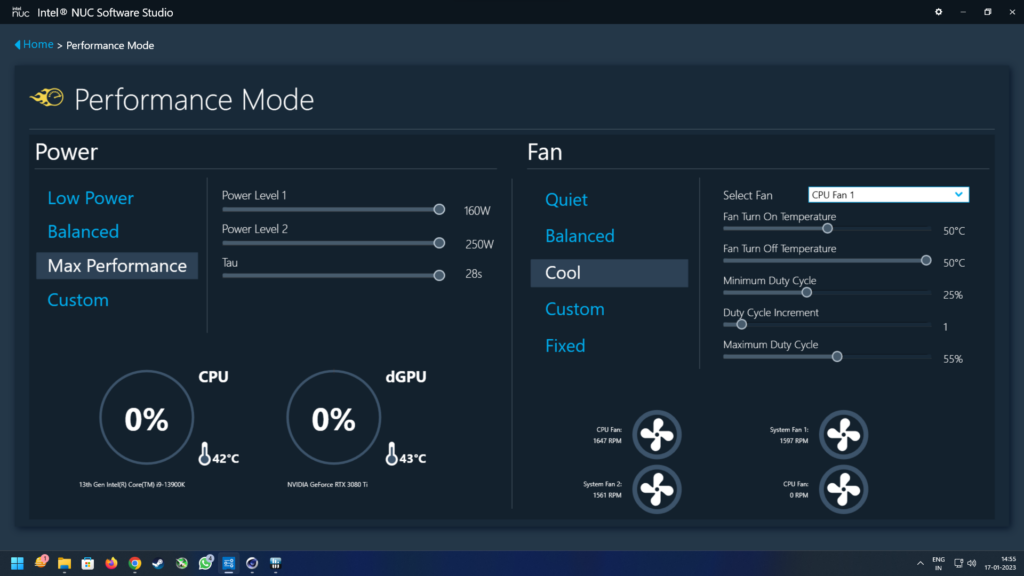
- Using Intel’s NUC software studio, one can choose between different power modes, control fan speed, and even tweak the RGB LEDs if you install them yourself. The software version we used for testing was an early build, so it had minor issues. But Intel has assured that the retail unit comes with a stable version of the software.
- The NUC 13 Extreme can accommodate some really powerful graphics cards. There’s a 3-slot limit, though, so don’t even think about upgrading to the Nvidia RTX 4090 or 4080. The power supply is rated at 750W Gold, which is really important to consider before popping in your own GPU. The ASUS TUF RTX 3080 Ti that was provided to us with the kit managed to hold up well, but there was one instance where Marvel’s Spider-Man Remastered twice when cranked up to the highest settings with ray-tracing enabled crashed down. After some tweaking, we were able to play every single AAA title without a hitch. Overall gaming performance, in general, is on par with almost any desktop system with a modern Intel CPU paired with an RTX 3080 Ti.
Decision
Intel has done a stellar job here. The NUC 13 Extreme is not only enthusiast-grade barebones kit, but also a gateway to Intel’s latest 13th-gen desktop CPUs. It offers excellent performance, a well-ventilated chassis and state-of-the-art I/O selection. It’s much easier to configure than building an entire PC from the ground up, and at the same time, it caters to a niche community of small form factor PC lovers.
On the other hand, there’s no denying the fact that building your own PC is cheap. At the time of writing this review, Intel has not confirmed the pricing of the NUC 13 Extreme in India. However, we do have US pricing for this kit which starts at $1179 (roughly Rs. 96,236) for the Core i5 model and goes up to $1549 (roughly Rs. 1,26,412) for the Core i9. With that said, you need to consider taxes and the added cost of storage, memory and possibly a dedicated GPU. In fact, even if you build a smaller form factor PC with similar components, you’re going to save a few bucks.
With better marketing and slightly better pricing, Intel could potentially sell a good number of these kits.
Editor’s rating: 4/5
Pros:
- small footprint
- excellent performance
- well ventilated
- static thermal
- Provision for 3-slot GPU
Shortcoming:
- cheap to build your pc
- PL1 and PL2 Power Limits
- Laptop DDR5 Memory


