

What is CEIR? How does this work?
CEIR serves as a common mechanism for all network operators to exchange data on blacklisted mobile devices, ensuring that blacklisted devices in one network will not work on another, even if the device has SIM card has been changed.
CEIR is not like Google’s Find My Device. To use the Find My Phone function, your phone or tablet must be turned on, signed in to a Google Account, connected to mobile data or Wi-Fi, visible on Google Play, and location and Find My device’ must be on. In contrast, CEIR only uses the IMEI number to locate a lost or stolen mobile phone. The portal will aggregate data from telecom operators across the country, so there will be no need for an active internet connection or logging in with an ID.
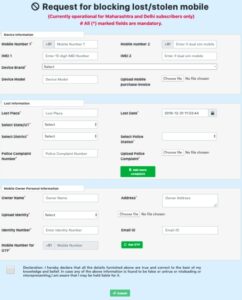
How to block/locate lost/stolen phone using IMEI number on CEIR
- step 1: Before submitting the request to CEIR, users should report the lost or stolen phone to the nearest police station.
- step 2: Visit the website of CEIR https://ceir.gov.in/Home/index.jsp. – To disable the IMEI number of the handset.
- step 3: On the main page of CEIR, click on the ‘Block Stolen/Lost Mobile’ button. When you select this option, you will be taken to the ‘Request for Blocking Lost/Stolen Mobile Phone’ form page. The page will request information like your mobile number, device brand, lost location, date of loss, owner name, address, identity verification and other details. Quickly fill in the details, enter OTP, click on declare and submit.
- step 4: Once you have entered your information, you will be given a Request ID which you can use to track your stolen phone.
- Step 5: If you have recovered your stolen phone, you can unblock the blocked IMEI number. To do so, go to the CEIR main page, click on ‘Un-Block Found Mobile’, enter the Request ID and cellphone number, and then click on Submit. You can also check the status of your request from the home page by clicking on ‘Check IMEI Request Status’.


