

Samsung made a remarkable comeback in the laptop segment in the country only last year, a category that has seen its fair share of ups and downs in the recent past. As it is known to do in other areas, the brand showcased its prowess in the laptop space as well, as was evident from the lineup introduced in India early last year. The latest Book3 series not only brings the expected hardware bump, but also shows how Samsung is getting more serious in this hotly-contested space. My device of choice as I’m kicking off this review is the Samsung Galaxy Book 3 Pro 360 – it’s a mouthful of an apt name for a loaded machine.
design and performance
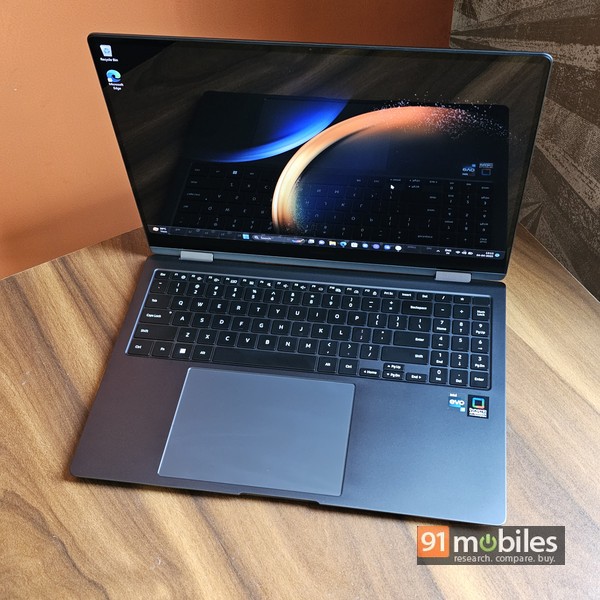
The fact that it collects smudges like there’s no tomorrow might be the only niggle I have with the graphite-coloured Galaxy Book 3 Pro’s design and build. Among its most notable aspects, there’s the 16-inch display that gives it its large footprint, but apart from that, it’s a sleek machine that’s solidly built and weighs just 1.66kg despite its metal build. There’s subtle Samsung branding on the lid, which opens to reveal a full-sized keyboard, complete with a dedicated num-pad and a huge trackpad that looks wider than the width of the keyboard actually is.

A pair of large, solid hinges hold the screen in place, with the latter having a noticeably wide chin, but thin bezels on the other three sides. A webcam is located at the top as usual. Justifying the 360 in its moniker, the screen flips over 360 degrees to fold flat onto the keyboard. It is a touchscreen display, so you can use the device as a large tablet or in tent mode for watching movies etc. Samsung also includes an S Pen in the box, and combined with the large screen real estate, the laptop feels ideal for the creative and creative. Graphics Professional.

I wouldn’t go so far as to say the device couldn’t do with more ports, but as things stand, the options provided look sufficient for most intents and purposes. On the right, there’s a microSD card reader, a USB Type-A 3.2 port, and a 3.5mm audio combo port, while the left houses a pair of Thunderbolt 4-capable Type-C ports, along with an HDMI socket. I think that’s enough to cover the basics. Wireless connectivity is taken care of by Bluetooth 5.1 and Wi-Fi 6e.

Talking about the display, it is one of the main highlights of the Galaxy Book 3 Pro 360. It sports a 16-inch Dynamic AMOLED 2X panel that offers 3K (2,880 x 1,800) resolution and supports up to 120Hz refresh rate. Samsung’s AMOLED displays are considered the best in the biz and the one on the Galaxy Book 3 Pro 360 does nothing to change that – it’s a stunning screen that brings visuals to life with rich colours, great dynamic range and superb smoothness. brings in Using this machine to watch movies is a fun experience, and I can confidently say that graphics professionals and creative people will find this screen capable enough. The only downside is that the screen is quite reflective, so you need to be mindful of the light behind you when using it.
keyboard and trackpad
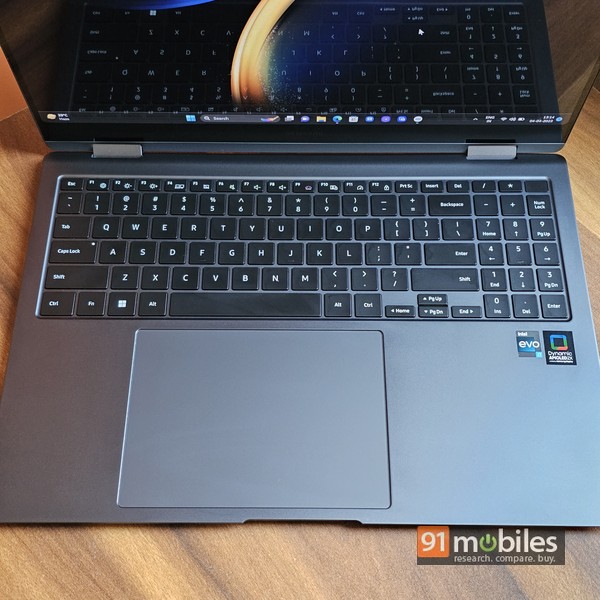
The keyboard is spacious and a cinch to type on, while the dedicated numpad comes in handy if you’re doing work that involves lots of spreadsheets. There’s a fingerprint scanner built into the power key on the top right, and it works quite well too – giving you access to the machine in an instant. Windows Hello is also supported. The keys have a three-stage backlight for working in the dark – this is also a useful feature. The backlight can be set to automatically come on when ambient light is low, and automatically turn off if the device is left idle for a specified period of time. On the plus side, I do find the half-size arrow keys feel a bit cramped. Big, Big, huge touchpad is enough. It makes it easy to navigate around the UI and use multi-finger gestures, and is quite smooth and responsive as well. Be aware, however, that the touchpad sits off-center, and aligns with the main keyboard. And because of its large size, you can sometimes accidentally tap it on the right side… at least until you get used to it.
software

Windows 11 Home comes preloaded, and Samsung throws in Microsoft Office Home and Student editions as well – always a useful inclusion I suppose. What may not be useful to many users is the smorgasbord of Samsung-branded software that comes preloaded on laptops. Unless you are already a Samsung user and call yourself the proud owner of a Samsung Galaxy smartphone and/or tablet, some of this software will be bloatware to you. However, if you’re invested in the Samsung ecosystem, many of these tools, utilities, and features may come in handy. For example, there’s a feature called Multi Control that lets you use a laptop’s keyboard and trackpad to control a Samsung smartphone over the same Wi-Fi network, and you can wirelessly transfer documents and images between the two devices. Can also drag and drop. Similarly, the Second Screen feature lets you use a Samsung tablet as a secondary display for a laptop. Samsung Notes is a handy tool too, especially since it plays nice with the S Pen and syncs across Samsung phones and tablets. You also get Samsung Settings that give access to some options not available under regular Windows settings, such as customizing the keyboard backlight, turning on the battery protection feature that limits charging to 85 percent, and setting the laptop’s battery life. Enables USB charging when in hibernate or shutdown. ,
performance and battery life

Intel’s 13th Generation Core i7-1360p processor powers the show, coupled with 16G of LPDDR5 RAM and a 1TB NVMe SSD. Needless to say, this combination packs enough grunt for all common tasks, and that ranges from regular productivity apps, to general web browsing with Chrome tabs, as well as heavy graphics and design applications used by creators. Everything is included. The machine handles these with confidence and there is no lag or stutter to spoil the experience in any way. The performance is also reflected in the skill benchmark figures. That said, heavy games don’t run smoothly due to the Intel Iris Xe graphics on board, and it would be safe to say that serious gamers should look elsewhere.

The 76Wh battery provides all-day battery life with moderate usage. It lasted 9 hours 46 minutes in PCMark 10’s Modern Office battery test scenario, which is pretty decent. Samsung ships a 65W Type-C charger in the box, which should top the laptop’s battery up to 50 percent in 45 minutes and up to 100 in an hour.

The 1080p webcam does its job — there’s nothing to complain about. The Galaxy Book 3 Pro 360 also comes equipped with an AKG quad-speaker system with Dolby Atmos support. Bass isn’t its strong suit and its low position can muffle the sound a bit if you use the laptop on your lap or in bed, but other than that, the speakers deliver loud, rich sound that is, for the most part, loud and clear. Should be sufficient for – use cases other than music, ie.
Decision

For its price of Rs 1,63,990 (there’s a Core i5-powered version at Rs 1,55,990), the Galaxy Book 3 Pro 360 isn’t cheap. But again, this is a premium device that delivers on most aspects including essentials like performance and battery life. Thanks to its large and capable 16-inch AMOLED touchscreen, its 2-in-1 form factor and the inclusion of the S Pen, it looks ideal for creative professionals and content creators looking to make the best use of the ample screen real estate Are. And the power that he packs to craft his masterpieces.
Editor’s rating: 4/5
Pros:
- Large, Capable Display
- smooth performance
- S Pen included
Shortcoming:
- prone to staining
- reflective screen
- bloatware


